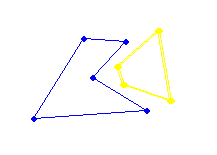
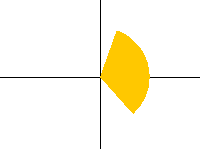
ÿþ<!DOCTYPE HTML PUBLIC "-//W3C//DTD HTML 4.0 Transitional//EN"> <HTML><HEAD><TITLE>Separability of 2 simple polygons through single translation</TITLE> <META http-equiv=Content-Type content="text/html; charset=unicode"> <!-- #include file="top.inc" --> <!-- top starts here --> <html> <head> <meta name="GENERATOR" content="Microsoft FrontPage 5.0"> <meta name="ProgId" content="FrontPage.Editor.Document"> <link rel="stylesheet" type="text/css" href="/styles.css"> </head> <body topmargin="0" leftmargin="0"> <center> <table border="0" cellpadding="0" cellspacing="0" style="border-collapse: collapse" bordercolor="#111111" width="770" height="80"> <tr> <td width="770" height="40" colspan="4"><span lang="fr-ca"></span></td> </tr> <tr> <td width="20" height="38"></td> <td width="800" align="center" height="38"> <p align="left" class="topmenu"> ::&nbsp; <a href="welcome.html">Intro</a>&nbsp; ::&nbsp; <a href="point1.html">P as a point I</a>&nbsp; ::&nbsp; <a href="point2.html">P as a point II</a>&nbsp; ::&nbsp; <a href="edge.html">P as an edge</a>&nbsp; ::&nbsp; <a href="polygon.html">P as a polygon</a>&nbsp; ::&nbsp; <a href="barrier.html">Barrier Regions</a>&nbsp; ::&nbsp; <a href="applet.html">Applet</a>&nbsp; ::&nbsp; <a href="conclusion.html">Conclusion</a> &nbsp;:: </td> </tr> <tr> <td width="770" colspan="4" height="2"> <IMG src="images/common/dot-horz.gif" width="770" height="2"></td> </tr> </table> <table border="0" cellpadding="0" cellspacing="0" style="border-collapse: collapse" bordercolor="#111111" width="770" height="184"> <tr> <td width="20" height="184"><span lang="fr-ca"></span></td> <td width="574" valign="top" height="184"> <p> <br> <!-- top ends here --> <LINK href="styles.css" type=text/css rel=stylesheet><!-- Start of Main column --> <BODY> <span lang="fr-ca"> <table border="0" cellpadding="6" cellspacing="0" width="620" style="BORDER-COLLAPSE: collapse" bordercolor="#111111"> <tr> <td> <span class="BoldTitle">The problem</span> <table class="content" border="0"> <tr height="50" align="center"> <td width="75">&nbsp;</td> <td width="200">What's given</td> <td width="200">What we want</td> </tr> <tr height="50" align="center"> <td>Formally:</td> <td><font color="orange">A polygons P with n vertices</font><br> <font color="blue">A polygon Q with m vertices</font><br>Both <b>simple</b> and <b>disjoint</b></td> <td>The <b>movability wedge of P w.r.t. Q</b><br> i.e. all directions in which P can be<br>taken arbitrarily far from Q in one shot</td> </tr> <tr height="50" align="center"><td>Example:</td> <td><img border=0 src="images/intro/pq.bmp" width="217" height="155"></td> <td><img border=0 src="images/intro/wedge.bmp" width="212" height="149"></td> </table> <span class="BoldTitle">The main application</span> <p class="content">The most obvious application is in the grasping problem in robotics. <br>Consider <font color="blue">Q as a 2D robot hand</font> and <font color="orange">P as an object</font>: <table class="content" border="0"> <tr> <td align="center"> <img border="0" src="images/intro/hand1.bmp" width="184" height="126"> <br><img border="0" src="images/intro/hand1wedge.bmp" width="119" height="90"> </td> <td align="center"> <img border="0" src="images/intro/hand2.bmp" width="208" height="142"> <br><img border="0" src="images/intro/hand2wedge.bmp" width="106" height="98"> </td></tr> <tr align="center"> <td>The wedge is NOT empty i.e.<br>the hand is NOT grasping the object</td> <td>The wedge is empty i.e.<br>the hand IS grasping the object</td> </tr> </table> <p><span class="BoldTitle">The algorithm presented on this web site</span> <p class="content">I will present an algorithm by Toussaint and Sack from 1987. We first consider <a href="point1.html">P as being a single point</a>, that in turn will help us find the wedge when <a href="edge.html">P is an edge</a>, and finally, we'll get to the case where <a href="polygon.html">P is a simple polygon</a>. <p class="content">An <a href="applet.html">applet</a> is provided that generates the movability wedge for any valid P and Q drawn by the user. </td> </tr> </table> </span><!-- End of Main column --> <!-- #include file="right_bottom.inc" --> <!-- right_bottom start here --> </td> <td width="12" height="184"><span lang="fr-ca"></span></td> <td width="19" height="184" valign="top" background="images/common/line.gif"> <img border=0 height=125 name=line src="images/common/line.gif"width=19><br> <IMG border=0 height=24 name=ball-b src="images/common/ball-b.gif" width=19><br> <IMG border=0 height=114 name=line src="images/common/line.gif" width=19><br> <IMG border=0 height=20 name=ball-m src="images/common/ball-m.gif" width=19><br> <IMG border=0 height=54 name=line src="images/common/line.gif" width=19><br> <IMG border=0 height=14 name=ball-s src="images/common/ball-s.gif" width=19><br> &nbsp;</td> <td width="15" height="184"><span lang="fr-ca"></span></td> <td width="115" height="188" valign="top"> <table border="0" cellpadding="0" cellspacing="0" style="border-collapse: collapse" bordercolor="#111111" width="115" id="AutoNumber3"> <tr> <td width="115" height="20"></td> </tr> <tr> <td width="115"> </td> </tr> </table> <br> <!-- Links --> <table border="0" cellpadding="2" cellspacing="0" style="border-collapse: collapse" bordercolor="#111111" width="100%"> <tr><td width="100%"><span class="rightmenu"><A href="welcome.html">Intro</A></span></td></tr> <tr><td width="100%"><span class="rightmenu"><A href="point1.html">P as a point I</A></span></td></tr> <tr><td width="100%"><span class="rightmenu"><A href="point2.html">P as a point II</A></span></td></tr> <tr><td width="100%"><span class="rightmenu"><A href="edge.html">P as an edge</A></span></td></tr> <tr><td width="100%"><span class="rightmenu"><A href="polygon.html">P as a polygon</A></span></td></tr> <tr><td width="100%"><span class="rightmenu"><A href="barrier.html">Barrier Regions</A></span></td></tr> <tr><td width="100%"><span class="rightmenu"><A href="applet.html">Applet</A></span></td></tr> <tr><td width="100%"><span class="rightmenu"><A href="conclusion.html">Conclusion</A></span></td></tr> </table> <p> </td> <td width="15" height="184"><span lang="fr-ca"></span></td> </tr> </table> <table border="0" cellpadding="0" cellspacing="0" style="border-collapse: collapse" bordercolor="#111111" width="770" id="AutoNumber2"> <tr> <td width="2"></td> <td width="636" background="images/common/Texture_blue5.gif"> <p>&nbsp;<p>&nbsp;</td> <td width="136" background="images/common/Texture_blue5.gif"> <p class="language"> </td> </tr> <tr> <td width="2" rowspan="2">&nbsp;</td> <td width="768" colspan="2"> <p align="center" class="bottom"> <BR> Website created by <a href="mailto:michel.langlois@mail.mcgill.ca">Michel Langlois</a><BR> COMP 507: Computational Geometry <BR> Instructor: <a href="http://www.cs.mcgill.ca/~godfried">Godfried Toussaint</a>, Teaching Assistant: <a href="http://www.cs.mcgill.ca/~athens">Greg Aloupis</a><BR> School of Computer Science, McGill University, Montreal, Fall 2003 <BR> </td> </tr> </table> <table border="0" cellpadding="0" cellspacing="0" style="border-collapse: collapse" bordercolor="#111111" height="50" width="770" id="AutoNumber4"> <tr> <td width="770"> <IMG src="images/common/dot-horz.gif" width="770" height="2"></td> </tr> </table> </center> <!-- right_bottom ends here --> </BODY></HTML>